Advanced BPMN concepts#
This section builds on the BPMN basics and introduces additional, more advanced BPMN concepts.
Alternative start events#
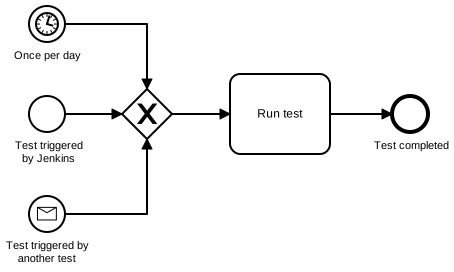
While a plain  start event can already be triggered through APIs to start processes programmatically, BPMN itself defines multiple specialised start mechanisms. For example, a
  timer start event can launch a new process instance periodically; a
  message start event reacts to a correlated BPMN message (even from another process instance); and a
  signal start event broadcasts a signal that can start many process instances at once.
 more-start-events.bpmn#
The above example introduced the following new event types:
- message events – for sending and receiving targeted messages (e.g. inter‑process communication)
- signal events – for broadcasting notifications to any process instance listening for the named signal
Intermediate events#
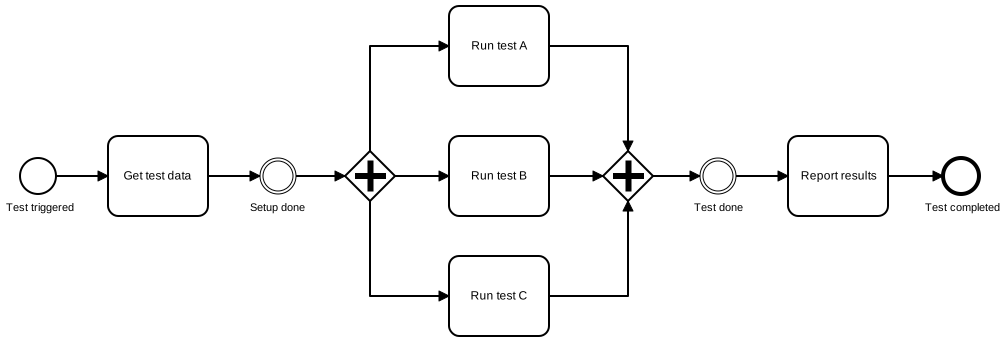
In addition to start events,  end events, and
  boundary events, BPMN defines
  intermediate events. A simple use case is inserting empty intermediate events to mark relevant business states in the process (later usable as metrics or KPI anchors in data analysis).
 intermediate-events.bpmn#
Even more events#
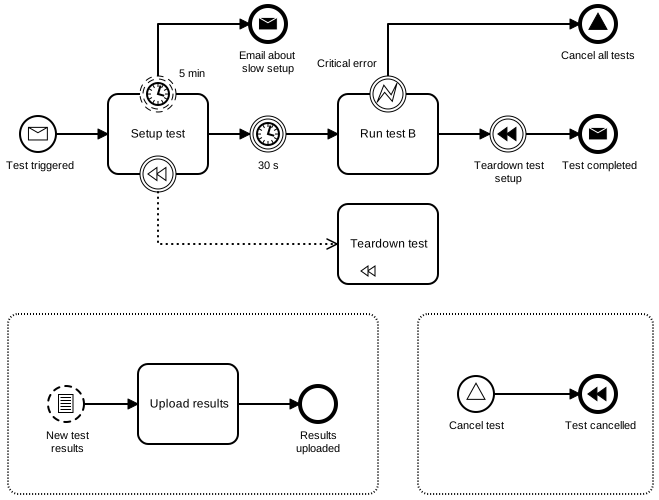
Events in BPMN 2.0 include: start events (interrupting and non‑interrupting), intermediate throw and catch events, boundary events (interrupting and non‑interrupting), and end events – each available in multiple specialised types.
more-events.bpmn#
The above example introduced the following new event types:
 signal event – broadcasts a global signal that any listener can catch
 conditional event – triggers when a condition becomes true (e.g. a process variable value change)
 compensation event – triggers compensation handlers for already completed activities
Message events#
Message events are mainly a way to achieve inter‑process communication within the engine. In Operaton, they can also be configured to behave like a service task. Operaton further allows a single message to have multiple recipients (even though that is outside the BPMN specification).
- message start event – triggers a new process instance when a matching message is correlated in the engine
 intermediate message throw event – sends a one‑to‑one message from one process to another
 intermediate message catch event – waits for a matching message to be correlated
 message end event – throws a message and ends the process instance
Operaton correlates messages by name plus flexible configuration criteria, ranging from an exact process ID to matching multiple variable values.
Signal events#
Signal events are the official BPMN way to broadcast messages to more than one receiving process.
- signal start event – starts a new process instance when a signal is received
- intermediate signal throw event – broadcasts a signal in the engine
 intermediate signal catch event – waits for a signal
 signal end event – broadcasts a signal and ends the process instance
Operaton matches signals by name only.
Compensation#
It is common in BPMN that the same outcome can be modelled in multiple ways. For example, releasing a reserved resource when a process is cancelled can be achieved with just basic BPMN constructs:
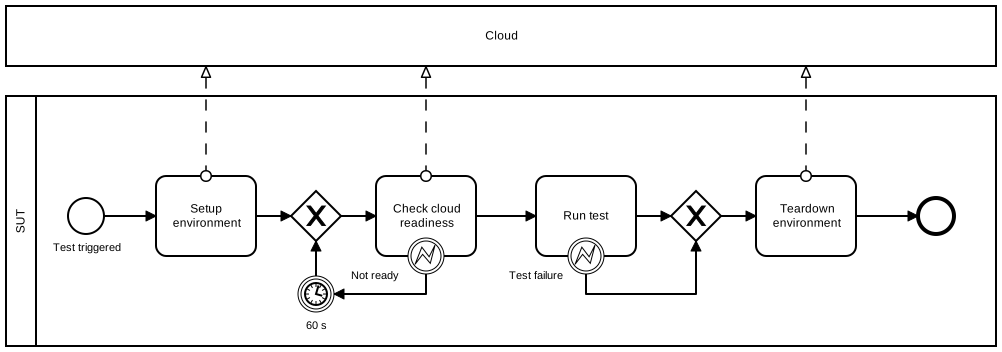
Alternatively, the same can be achieved with a  compensation event plus accompanying
  compensation tasks attached via
  boundary events to the tasks they would undo (assuming those tasks completed successfully):
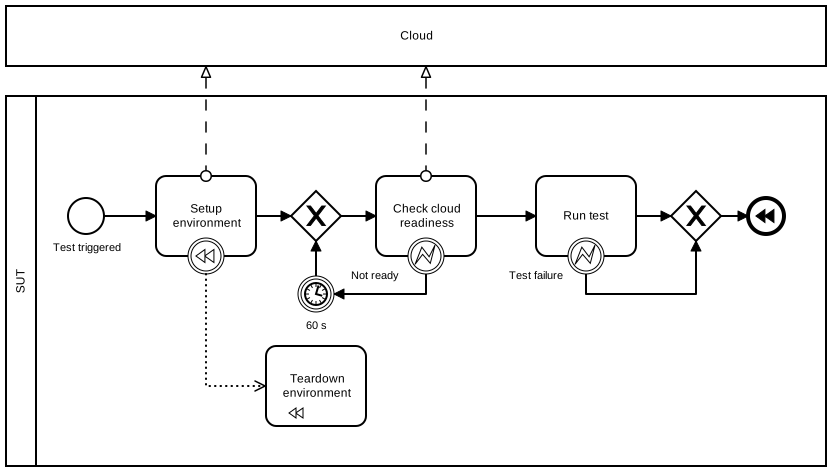
When a process ends with a compensation end event, the engine automatically executes the attached handlers for successfully completed tasks, in reverse completion order. with-compensation.bpmn#
Multi-instance#
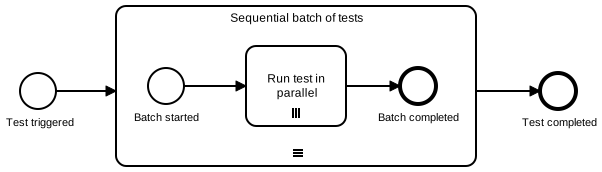
Tasks and embedded sub‑processes can be configured as multi‑instance – the BPMN way to loop over a collection. The mode can be  parallel or
  sequential. A multi‑instance marker requires an input collection; the engine then executes the task or sub‑process once per item (each with isolated instance‑local variables) using a single BPMN symbol.
 multi-instance-subprocess.bpmn#
Script task#

Script task executes custom script logic directly within the process engine. Supported scripting languages depend on the engine but commonly include JavaScript, Groovy, or Python (via Jython, or hopefully GraalPy in the future).
In the Operaton BPMN engine, a script task can manipulate multiple process variables through its execution.setVariable API, or assign its return value to a single result variable.
Business rule task#
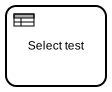
Business rule task is a specialised task type for automated, rule‑based decision making within a process. It is typically configured to use DMN (Decision Model and Notation) decision tables. DMN tables are designed to describe business rules in a tabular, testable format and can be maintained separately from process models, allowing faster iteration without redeploying the process definition.#
This test case selection example demonstrates how a business rule task with DMN decision table can be used to select test cases based on the test case selection criteria. Even in this simple example, the DMN table should be compact and easier to maintain than the equivalent conditional logic in classic programming languages.
When Hour of day integer | And A / B string | Then Test case string | Annotations | |
|---|---|---|---|---|
| 1 | [0..6] | "A" | "Nightly Test A" | - |
| 2 | [0..6] | "B" | "Nightly Test B" | - |
| 3 | [7..12] | "A" | "Morning Test A" | - |
| 4 | [7..12] | "B" | "Morning Test B" | - |
| 5 | [13..18] | "A" | "Daily Test A" | - |
| 6 | [13..18] | "B" | "Daily Test B" | - |
| 7 | [19..24] | "A" | "Evening Test A" | - |
| 8 | [19..24] | "B" | "Evening Test B" | - |